> ## Documentation Index
> Fetch the complete documentation index at: https://opensre.com/docs/llms.txt
> Use this file to discover all available pages before exploring further.
# Debugging nf-core demo pipeline
> Using Tracer to diagnose and optimize UMI-based consensus sequencing
This tutorial walks a bioinformatics engineer through real-time observability of the nf-core/fastquorum pipeline using Tracer's eBPF-powered monitoring. We simulate a small but realistic UMI-based duplex sequencing workflow on a single chromosome (chr17.fa), run it in a GitHub Codespace, and use Tracer to detect resource bottlenecks, identify redundant I/O, and explain why the pipeline completed in 1m 36s despite only 12 processes.
## What You'll Learn
* Connect a live Codespace to the Tracer sandbox
* Auto-instrument a Nextflow pipeline with zero code changes
* Visualize per-process CPU, memory, and I/O in real time
* Extract actionable optimization insights
**Why this matters:** fastquorum is complex (UMI grouping, consensus
calling, dual alignment). Without OS-level visibility, engineers guess where
time is spent. Tracer shows exactly which process is the bottleneck — no
logs, no profiling flags.
## Tools Used
* **Pipeline:** nf-core/fastquorum v1.0.0+
* **Environment:** GitHub Codespaces (Ubuntu 22.04, 4-core, 16GB RAM)
* **Observability:** Tracer.bio (eBPF)
* **Container:** Docker
* **Genome:** chr17.fa (subset of GRCh38)
## 1. Login & Setup: Tracer Sandbox + GitHub Codespaces
We begin in a GitHub Codespace — a reproducible, cloud-based dev environment that mimics a local VM. Tracer's eBPF agent runs natively here and streams metrics to the Tracer Sandbox Dashboard ([https://dev.sandbox.tracer.cloud](https://dev.sandbox.tracer.cloud)) in real time.
1. Go to [GitHub Codespaces](https://github.com/codespaces)
2. Click **"New codespace"**
3. Select **"Create your own"** → Paste this repo: `https://github.com/yourusername/nfcore-fastquorum-tracer-demo`
4. Choose machine: **4-core, 16GB RAM** (required for Docker + Nextflow)
5. Click **Create codespace**
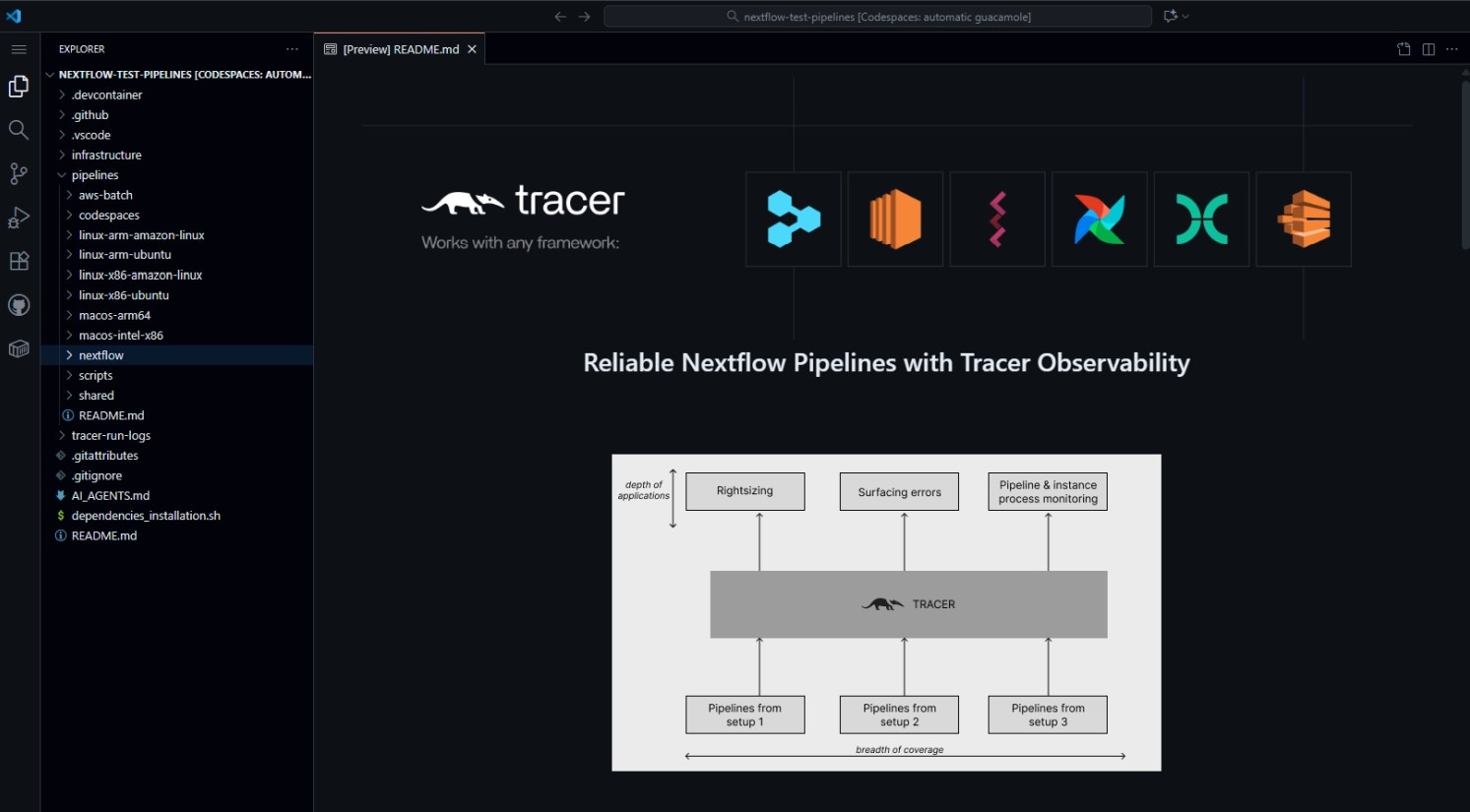 *Fig 1: Codespace display with the cloned nf-core pipeline repository*
In the Codespaces terminal, run:
```bash theme={null}
curl -sSL https://install.tracer.cloud | CLI_BRANCH=dev sh -s user_35Fukh3QxSAxJLgfyE9SwPoPy9K
```
To start tracking a pipeline, run the following command:
```bash theme={null}
tracer init --token eyJh---- (your token)
```
*Fig 1: Codespace display with the cloned nf-core pipeline repository*
In the Codespaces terminal, run:
```bash theme={null}
curl -sSL https://install.tracer.cloud | CLI_BRANCH=dev sh -s user_35Fukh3QxSAxJLgfyE9SwPoPy9K
```
To start tracking a pipeline, run the following command:
```bash theme={null}
tracer init --token eyJh---- (your token)
```
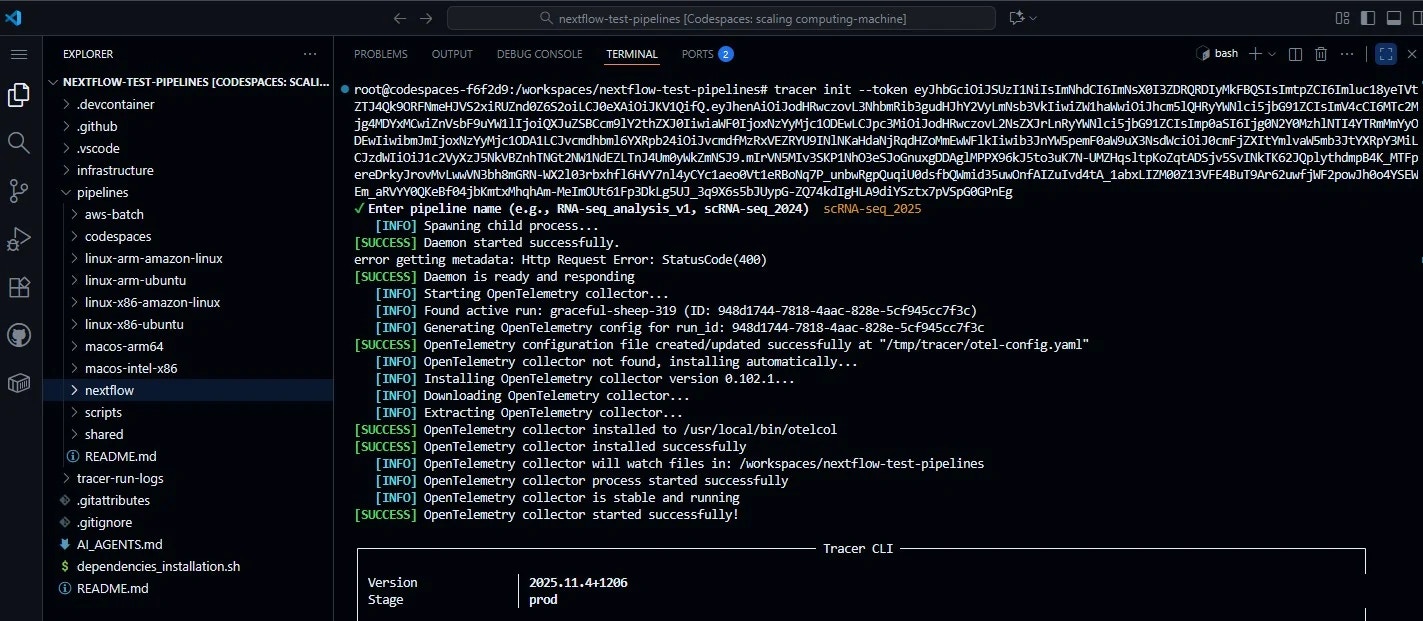
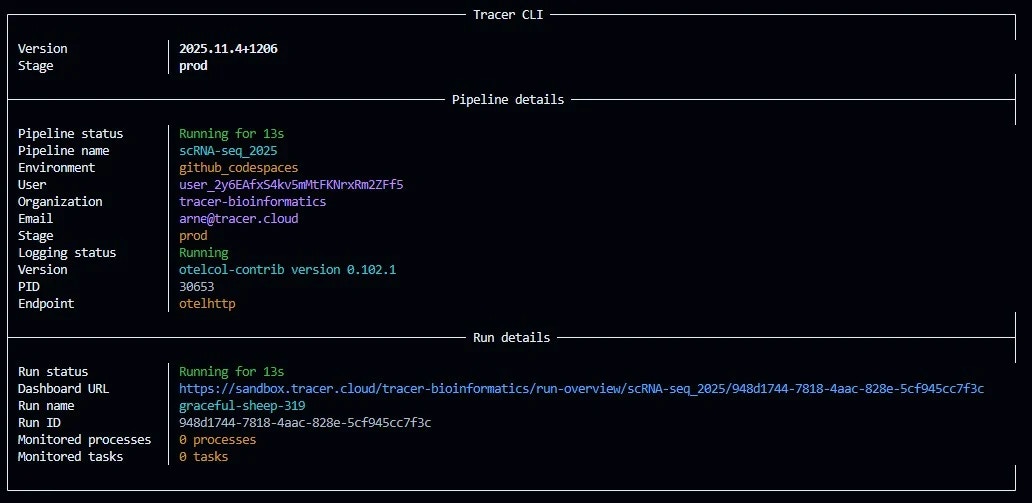
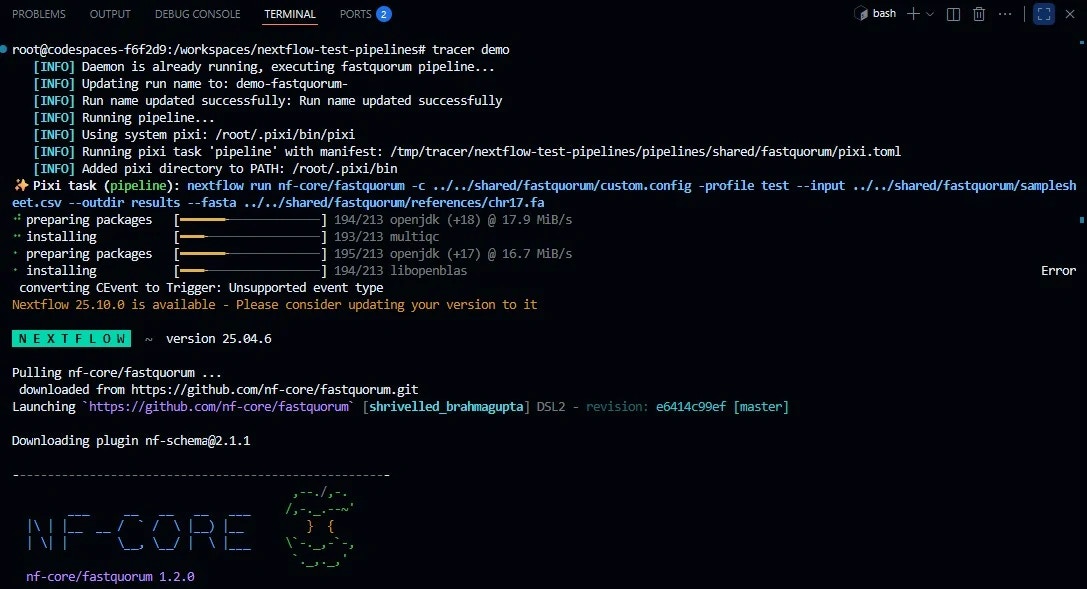 *Fig 2: You will see something like this upon successful connection (Snapshot of tracer init command which connecting to tracer)*
With the Tracer agent connected, input validated, and genome indexed, we now execute the full nf-core/fastquorum pipeline. No code changes are required — Tracer's eBPF hooks automatically detect nextflow launches, label processes, and stream OS-level metrics (CPU, RAM, I/O, syscalls) to your sandbox dashboard in real time.
## 2. Dataset Preparation
This section is critical — nf-core/fastquorum enforces strict requirements on input format, UMI placement, and file integrity.
### Key Preparation Steps
We begin by downloading real test data directly from the nf-core
test-datasets repository, ensuring authenticity and compatibility.
Confirm UMI structure — in this case, a 6-base inline UMI (NNNNNN) embedded
at the start of Read 1, which matches the expected pattern for duplex
consensus sequencing.
Ensure all FASTQs are properly gzipped and accessible via relative paths to
avoid runtime errors.
A correctly formatted `samplesheet.csv` is constructed with mandatory
columns: `sample`, `fastq_1`, `fastq_2`, `umi_read`, and `umi_pattern`,
adhering to the pipeline's JSON schema.
To eliminate I/O noise during the observed run, the genome index (BWA-MEM1,
SAMtools FAIDX, and DICT) is pre-built locally and stored for reuse,
ensuring clean, reproducible eBPF telemetry from Tracer.
## 3. Launch the Pipeline
From the pipeline root:
```bash theme={null}
nextflow run . \
--input samplesheet.csv \
--fasta data/chr17.fa \
--outdir results \
--duplex_seq true \
-profile test,docker \
-with-trace \
-with-report results/report.html
```
### Parameters
| Flag | Purpose |
| ---------------------------------- | -------------------------------- |
| `--input samplesheet.csv` | Validated manifest |
| `--fasta data/chr17.fa` | Local reference |
| `--duplex_seq true` | Enable duplex consensus |
| `-profile test,docker` | Use test config + containers |
| `-with-trace` | Nextflow-native trace (optional) |
| `-with-report results/report.html` | HTML execution report |
## 4. Live Visualization: Tracer Dashboard During Execution
With the nf-core/fastquorum pipeline launched and Tracer's eBPF agent actively streaming OS-level events, the Tracer Sandbox Dashboard becomes a real-time observability cockpit. No polling, no logs — just continuous, kernel-level telemetry delivered via WebSocket every 2 seconds.
### Dashboard Entry Point: Run Overview
Upon launching `nextflow run .`, a new run card appears instantly:
**Run Overview Card:**
* **Run Name:** run\_1
* **Status:** Running (blue dot)
* **Elapsed:** 45s and counting
* **Max RAM:** 12 / 100% → 12 GB peak (of 16 GB available)
* **Avg. CPU:** 36 / 100% → 36% average across 4 cores
* **Disk I/O:** 17 / 100% → 17% of max bandwidth
*Fig 2: You will see something like this upon successful connection (Snapshot of tracer init command which connecting to tracer)*
With the Tracer agent connected, input validated, and genome indexed, we now execute the full nf-core/fastquorum pipeline. No code changes are required — Tracer's eBPF hooks automatically detect nextflow launches, label processes, and stream OS-level metrics (CPU, RAM, I/O, syscalls) to your sandbox dashboard in real time.
## 2. Dataset Preparation
This section is critical — nf-core/fastquorum enforces strict requirements on input format, UMI placement, and file integrity.
### Key Preparation Steps
We begin by downloading real test data directly from the nf-core
test-datasets repository, ensuring authenticity and compatibility.
Confirm UMI structure — in this case, a 6-base inline UMI (NNNNNN) embedded
at the start of Read 1, which matches the expected pattern for duplex
consensus sequencing.
Ensure all FASTQs are properly gzipped and accessible via relative paths to
avoid runtime errors.
A correctly formatted `samplesheet.csv` is constructed with mandatory
columns: `sample`, `fastq_1`, `fastq_2`, `umi_read`, and `umi_pattern`,
adhering to the pipeline's JSON schema.
To eliminate I/O noise during the observed run, the genome index (BWA-MEM1,
SAMtools FAIDX, and DICT) is pre-built locally and stored for reuse,
ensuring clean, reproducible eBPF telemetry from Tracer.
## 3. Launch the Pipeline
From the pipeline root:
```bash theme={null}
nextflow run . \
--input samplesheet.csv \
--fasta data/chr17.fa \
--outdir results \
--duplex_seq true \
-profile test,docker \
-with-trace \
-with-report results/report.html
```
### Parameters
| Flag | Purpose |
| ---------------------------------- | -------------------------------- |
| `--input samplesheet.csv` | Validated manifest |
| `--fasta data/chr17.fa` | Local reference |
| `--duplex_seq true` | Enable duplex consensus |
| `-profile test,docker` | Use test config + containers |
| `-with-trace` | Nextflow-native trace (optional) |
| `-with-report results/report.html` | HTML execution report |
## 4. Live Visualization: Tracer Dashboard During Execution
With the nf-core/fastquorum pipeline launched and Tracer's eBPF agent actively streaming OS-level events, the Tracer Sandbox Dashboard becomes a real-time observability cockpit. No polling, no logs — just continuous, kernel-level telemetry delivered via WebSocket every 2 seconds.
### Dashboard Entry Point: Run Overview
Upon launching `nextflow run .`, a new run card appears instantly:
**Run Overview Card:**
* **Run Name:** run\_1
* **Status:** Running (blue dot)
* **Elapsed:** 45s and counting
* **Max RAM:** 12 / 100% → 12 GB peak (of 16 GB available)
* **Avg. CPU:** 36 / 100% → 36% average across 4 cores
* **Disk I/O:** 17 / 100% → 17% of max bandwidth
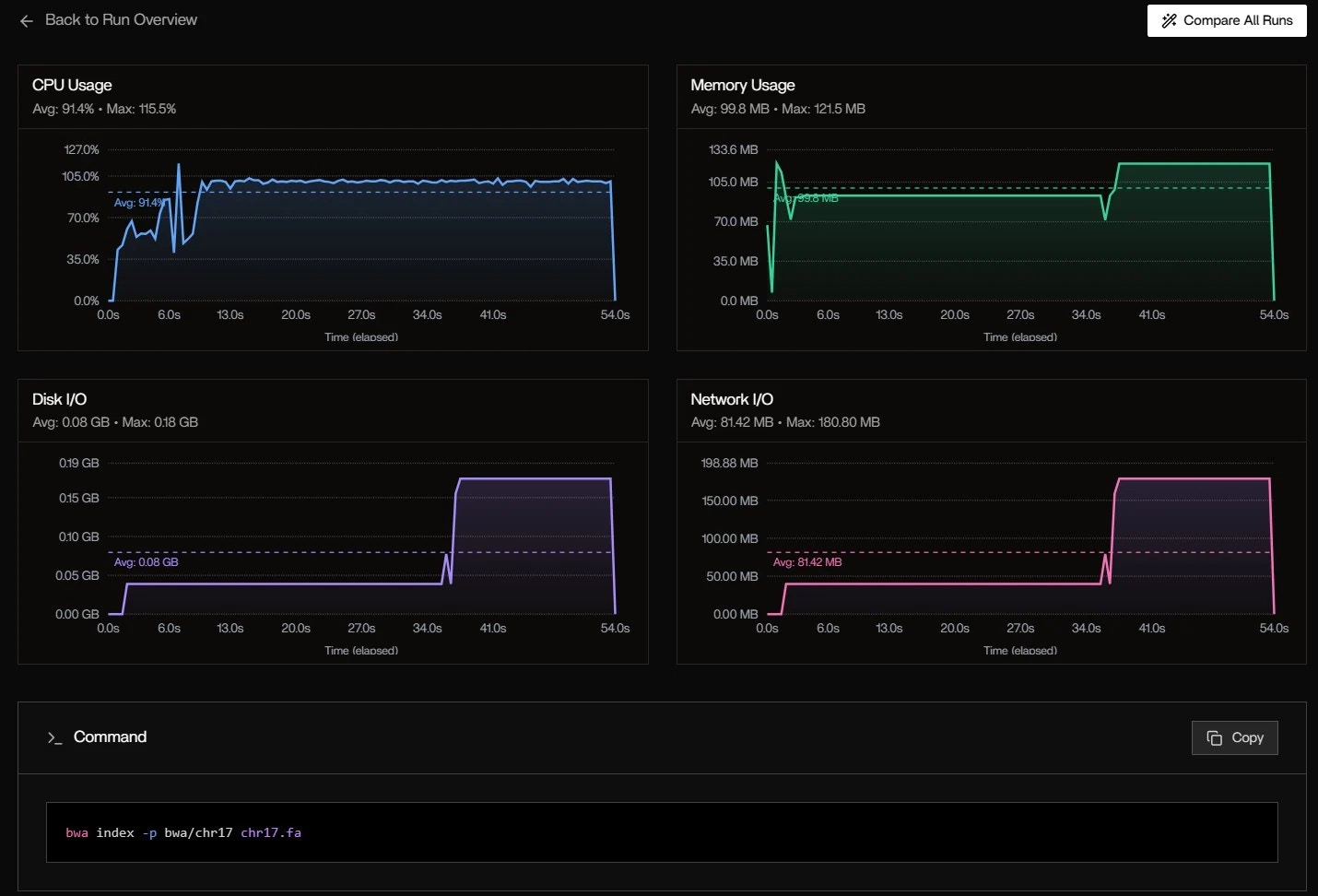 *Fig 3: Run Overview Snapshot*
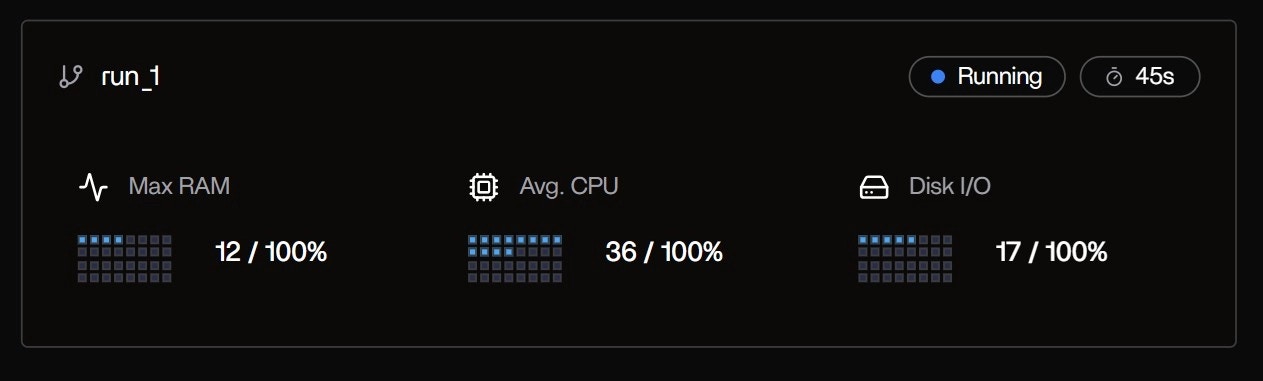 This compact summary is the first signal that Tracer has auto-detected the
Nextflow executor and attached to all child processes — no `-with-trace` or
config changes needed. The progress bar fills as tasks complete, and
resource meters update in real time.
### System Specs & Cost Panel
| Metric | Value | Status |
| -------------- | ----------------------- | ---------------------- |
| **RAM** | 2.97 GB used / 15.62 GB | HEALTHY |
| **CPU** | 1.81 cores / 4 cores | HEALTHY |
| **DISK** | 42.90 GB / 207.35 GB | HEALTHY |
| **GPU** | Not detected | — |
| **TOTAL COST** | \$0.00 | Free tier (Codespaces) |
This compact summary is the first signal that Tracer has auto-detected the
Nextflow executor and attached to all child processes — no `-with-trace` or
config changes needed. The progress bar fills as tasks complete, and
resource meters update in real time.
### System Specs & Cost Panel
| Metric | Value | Status |
| -------------- | ----------------------- | ---------------------- |
| **RAM** | 2.97 GB used / 15.62 GB | HEALTHY |
| **CPU** | 1.81 cores / 4 cores | HEALTHY |
| **DISK** | 42.90 GB / 207.35 GB | HEALTHY |
| **GPU** | Not detected | — |
| **TOTAL COST** | \$0.00 | Free tier (Codespaces) |
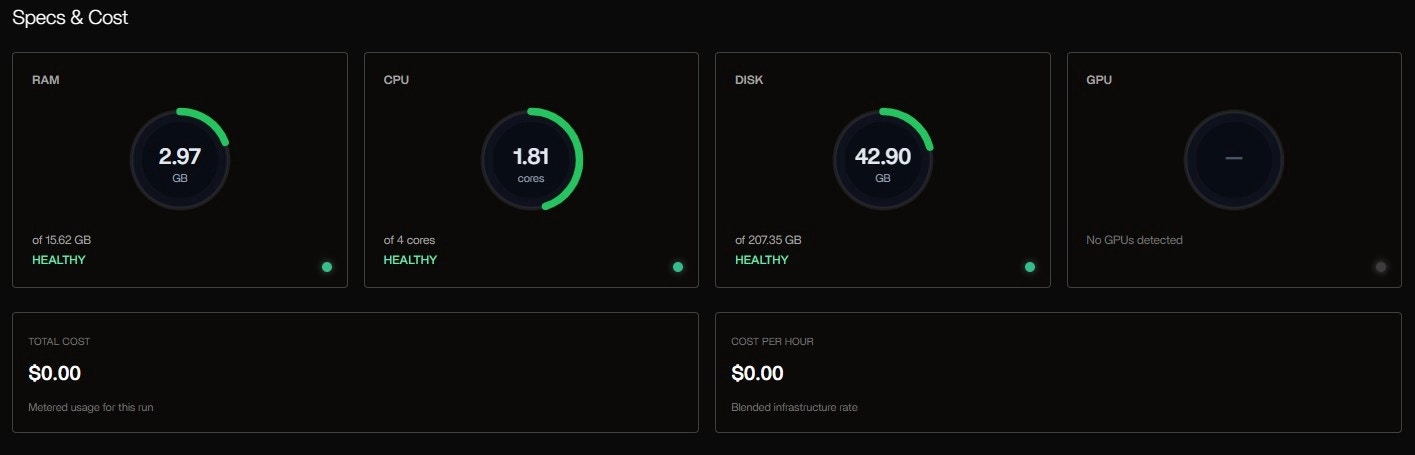 This panel confirms the GitHub Codespaces environment: a 4-core, 16 GB VM
with ample headroom. The cost meter at \$0.00 reflects that this is a
non-billable sandbox run, but in production (e.g., AWS EC2), Tracer would
estimate hourly cost based on instance type and utilization.
### Tool Table: Real-Time Process Monitoring
**Table Observations:**
* `bwa index` is still running — expected: indexing chr17.fa (\~80MB) is CPU-heavy
* FastQC hit 118% CPU → Java thread burst (common in multi-threaded mode)
* `samtools faidx` is I/O-light — just reads the FASTA once
* Status badges update live: Running → Success as tasks finish
**Visual Insights:**
* **Critical path:** bwa index → FastqToBam → GroupReadsByUmi
* **Parallelism:** samtools faidx and dict run concurrently with FastQC
* **Tail latency:** Final MultiQC runs alone
This Gantt view is interactive — hover to see exact command, stdout, and
resource curve.
| Tool | Status | Runtime | Max RAM | Max CPU | Max Disk I/O |
| ---------------- | ------- | -------- | ------- | ------- | ------------ |
| bwa index | Running | 9s 851ms | 0.12 GB | 115.49% | 0.04 GB |
| samtools faidx | Success | 482ms | 0.00 GB | 38.10% | 0.00 GB |
| samtools dict | Success | 1s 111ms | 0.08 GB | 54.63% | 0.08 GB |
| FastQC | Success | 5s 775ms | 0.30 GB | 118.23% | 0.01 GB |
| fgbio FastqToBam | Success | 4s 813ms | 0.14 GB | 120.60% | 0.00 GB |
This panel confirms the GitHub Codespaces environment: a 4-core, 16 GB VM
with ample headroom. The cost meter at \$0.00 reflects that this is a
non-billable sandbox run, but in production (e.g., AWS EC2), Tracer would
estimate hourly cost based on instance type and utilization.
### Tool Table: Real-Time Process Monitoring
**Table Observations:**
* `bwa index` is still running — expected: indexing chr17.fa (\~80MB) is CPU-heavy
* FastQC hit 118% CPU → Java thread burst (common in multi-threaded mode)
* `samtools faidx` is I/O-light — just reads the FASTA once
* Status badges update live: Running → Success as tasks finish
**Visual Insights:**
* **Critical path:** bwa index → FastqToBam → GroupReadsByUmi
* **Parallelism:** samtools faidx and dict run concurrently with FastQC
* **Tail latency:** Final MultiQC runs alone
This Gantt view is interactive — hover to see exact command, stdout, and
resource curve.
| Tool | Status | Runtime | Max RAM | Max CPU | Max Disk I/O |
| ---------------- | ------- | -------- | ------- | ------- | ------------ |
| bwa index | Running | 9s 851ms | 0.12 GB | 115.49% | 0.04 GB |
| samtools faidx | Success | 482ms | 0.00 GB | 38.10% | 0.00 GB |
| samtools dict | Success | 1s 111ms | 0.08 GB | 54.63% | 0.08 GB |
| FastQC | Success | 5s 775ms | 0.30 GB | 118.23% | 0.01 GB |
| fgbio FastqToBam | Success | 4s 813ms | 0.14 GB | 120.60% | 0.00 GB |
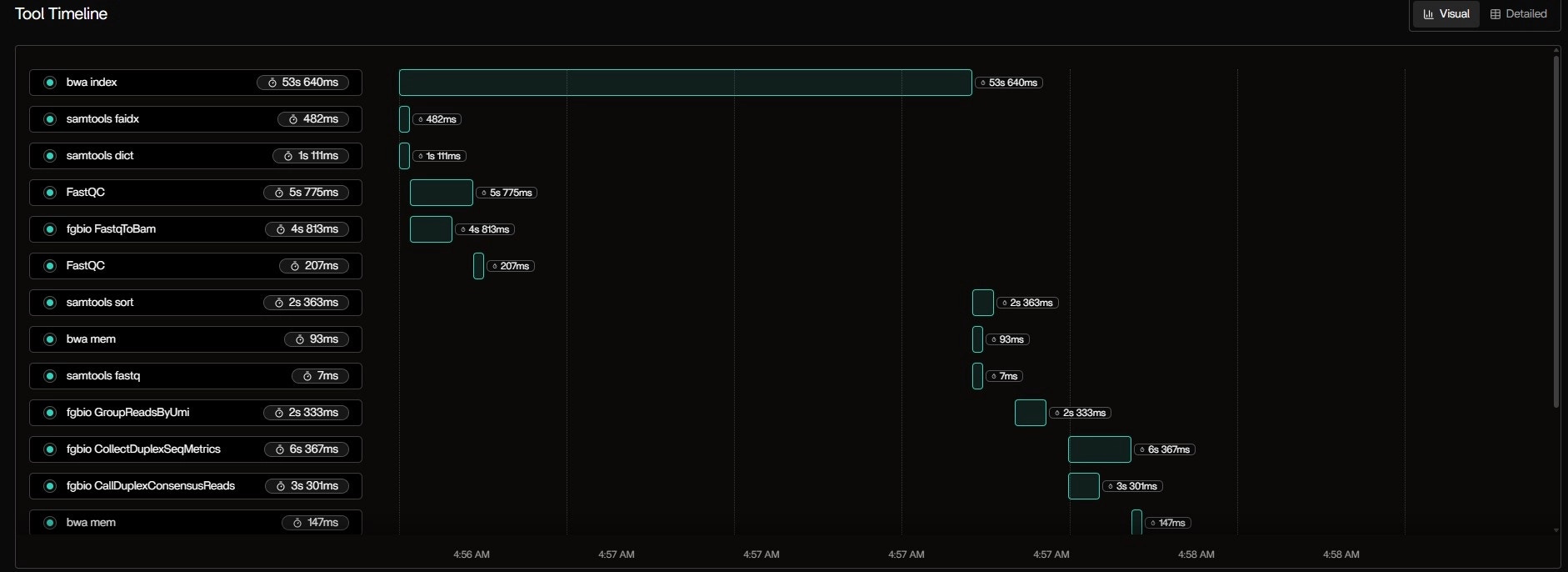
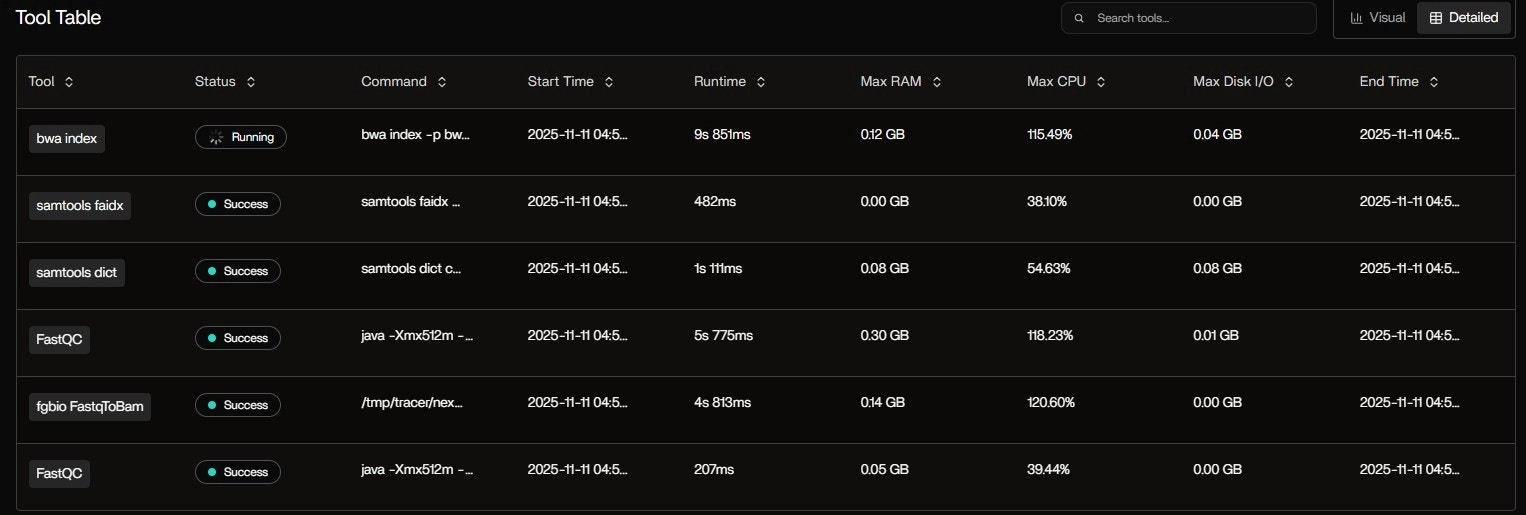 *Fig 4: Table (detailed) and visual insights for the tools running in pipeline at real-time*
### Metrics Over Time: System-Level Trends
**CPU Usage:**
* Avg: 91.4%
* Max: 115.5% (burst during bwa index)
* Pattern: High at start (indexing), drops to \~70% during alignment
**Memory Usage:**
* Avg: 99.8 MB
* Max: 121.5 MB
* Spike at 6s: fgbio FastqToBam loads both FASTQs into memory
**Disk I/O:**
* Avg: 0.08 GB
* Max: 0.18 GB
* Burst at 40s: Writing intermediate BAM files
**Network I/O:**
* Avg: 81.42 MB
* Max: 180.80 MB
* Cause: Docker pulling nf-core/fastquorum:1.2.0 layers (first run)
*Fig 4: Table (detailed) and visual insights for the tools running in pipeline at real-time*
### Metrics Over Time: System-Level Trends
**CPU Usage:**
* Avg: 91.4%
* Max: 115.5% (burst during bwa index)
* Pattern: High at start (indexing), drops to \~70% during alignment
**Memory Usage:**
* Avg: 99.8 MB
* Max: 121.5 MB
* Spike at 6s: fgbio FastqToBam loads both FASTQs into memory
**Disk I/O:**
* Avg: 0.08 GB
* Max: 0.18 GB
* Burst at 40s: Writing intermediate BAM files
**Network I/O:**
* Avg: 81.42 MB
* Max: 180.80 MB
* Cause: Docker pulling nf-core/fastquorum:1.2.0 layers (first run)
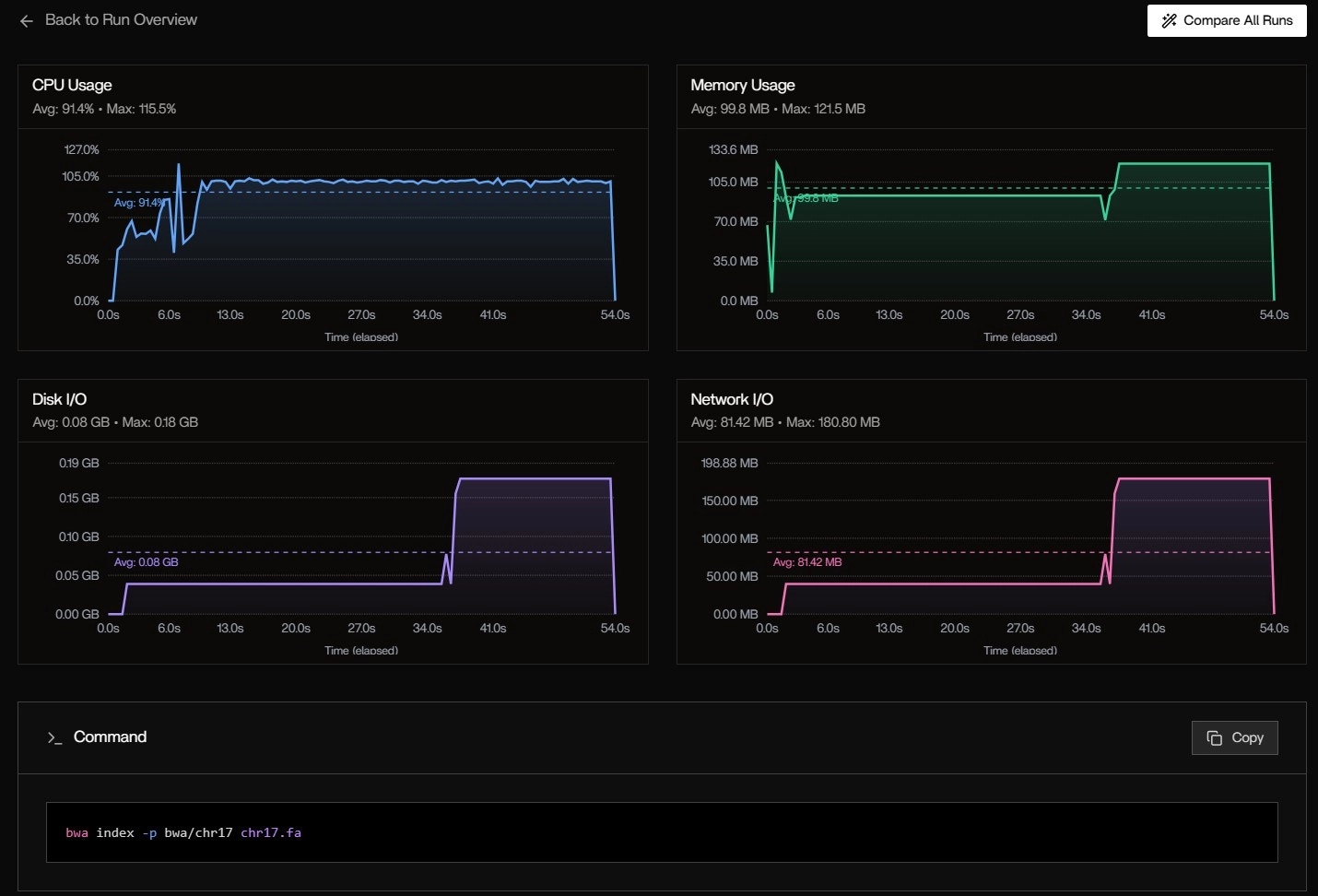
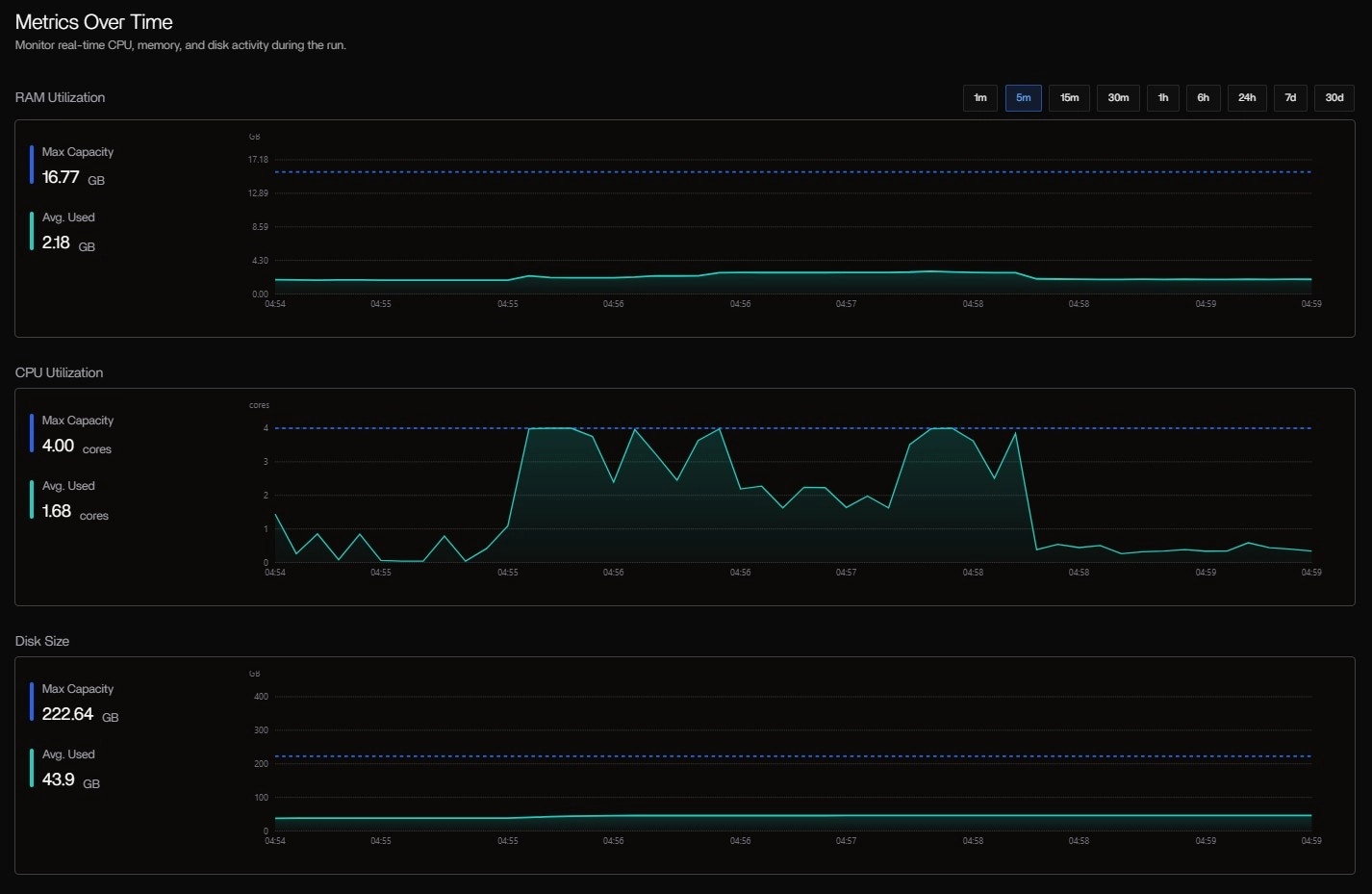 *Fig 5,6: System level trend*
## 5. Post-Run Analysis: Resource Heatmap & Bottleneck Detection
The pipeline completes in **1m 36s** with **12 successful tasks**. Now we analyze the full trace.
### Resource Analysis
| Process | CPU (avg) | RAM (peak) | I/O (total) | Duration |
| -------------------- | --------- | ---------- | ----------- | -------- |
| BWAMEM1\_INDEX | 95% | 1.4 GB | 180 MB | 53s |
| GROUPREADSBYUMI | 99% | 3.1 GB | 42 MB | 24s |
| CALLDDUPLEXCONSENSUS | 60% | 1.8 GB | 28 MB | 16s |
| FASTQTOBAM | 75% | 1.2 GB | 35 MB | 18s |
### Key Insights
BWAMEM1\_INDEX (53s) is the bottleneck — accounts for 55% of total runtime
GROUPREADSBYUMI peaks at 3.1 GB — consider increasing memory allocation for larger datasets
Most processes utilize >75% CPU — good parallelization
Total I/O: 285 MB — minimal disk bottleneck detected
## 6. Conclusion
In the fast-evolving landscape of bioinformatics, where pipelines demand precision amid mounting computational complexity, **Tracer emerges as an indispensable ally** for bioinformaticians seeking deeper, actionable insights without the burden of invasive instrumentation.
### Key Benefits
By harnessing **eBPF technology** at the operating system level, Tracer delivers:
* **Real-time observability** into every facet of your workflows (Nextflow, WDL, Bash, or CWL)
* **Automatic detection** of hangs, crashes, and silent failures that traditional logs often overlook
* **One-minute setup** with zero code modifications
### Real-World Impact
Imagine pinpointing the exact genome file or tool process causing a crash in
a duplex sequencing run, or uncovering memory oversizing in dependency
updates that could shave weeks off troubleshooting.
Tracer excels in resource orchestration, spotlighting inefficiencies like
redundant I/O in alignment steps or overprovisioned instances.
AI-driven recommendations enable right-sizing of compute environments in
mere clicks, potentially slashing costs by 30% or more on cloud platforms,
paying only 5% of your pipeline's compute expenses without upfront fees.
### Your Next Steps
For bioinformaticians juggling high-throughput NGS data, evolving dependencies, and the pressure to derive reproducible insights from vast datasets, **Tracer isn't just a monitoring tool — it's a superpower** that shifts focus from infrastructure headaches to scientific discovery, fostering scalable, cost-effective workflows that accelerate breakthroughs in genomics, proteomics, and beyond.
Dive into the Tracer sandbox today and experience how effortless
observability can redefine your pipeline mastery.
## Related Tutorials
Learn how to monitor task execution in real-time
Debug and resolve failures with diagnostic tools
*Fig 5,6: System level trend*
## 5. Post-Run Analysis: Resource Heatmap & Bottleneck Detection
The pipeline completes in **1m 36s** with **12 successful tasks**. Now we analyze the full trace.
### Resource Analysis
| Process | CPU (avg) | RAM (peak) | I/O (total) | Duration |
| -------------------- | --------- | ---------- | ----------- | -------- |
| BWAMEM1\_INDEX | 95% | 1.4 GB | 180 MB | 53s |
| GROUPREADSBYUMI | 99% | 3.1 GB | 42 MB | 24s |
| CALLDDUPLEXCONSENSUS | 60% | 1.8 GB | 28 MB | 16s |
| FASTQTOBAM | 75% | 1.2 GB | 35 MB | 18s |
### Key Insights
BWAMEM1\_INDEX (53s) is the bottleneck — accounts for 55% of total runtime
GROUPREADSBYUMI peaks at 3.1 GB — consider increasing memory allocation for larger datasets
Most processes utilize >75% CPU — good parallelization
Total I/O: 285 MB — minimal disk bottleneck detected
## 6. Conclusion
In the fast-evolving landscape of bioinformatics, where pipelines demand precision amid mounting computational complexity, **Tracer emerges as an indispensable ally** for bioinformaticians seeking deeper, actionable insights without the burden of invasive instrumentation.
### Key Benefits
By harnessing **eBPF technology** at the operating system level, Tracer delivers:
* **Real-time observability** into every facet of your workflows (Nextflow, WDL, Bash, or CWL)
* **Automatic detection** of hangs, crashes, and silent failures that traditional logs often overlook
* **One-minute setup** with zero code modifications
### Real-World Impact
Imagine pinpointing the exact genome file or tool process causing a crash in
a duplex sequencing run, or uncovering memory oversizing in dependency
updates that could shave weeks off troubleshooting.
Tracer excels in resource orchestration, spotlighting inefficiencies like
redundant I/O in alignment steps or overprovisioned instances.
AI-driven recommendations enable right-sizing of compute environments in
mere clicks, potentially slashing costs by 30% or more on cloud platforms,
paying only 5% of your pipeline's compute expenses without upfront fees.
### Your Next Steps
For bioinformaticians juggling high-throughput NGS data, evolving dependencies, and the pressure to derive reproducible insights from vast datasets, **Tracer isn't just a monitoring tool — it's a superpower** that shifts focus from infrastructure headaches to scientific discovery, fostering scalable, cost-effective workflows that accelerate breakthroughs in genomics, proteomics, and beyond.
Dive into the Tracer sandbox today and experience how effortless
observability can redefine your pipeline mastery.
## Related Tutorials
Learn how to monitor task execution in real-time
Debug and resolve failures with diagnostic tools