> ## Documentation Index
> Fetch the complete documentation index at: https://opensre.com/docs/llms.txt
> Use this file to discover all available pages before exploring further.
# Showcase
> Real-world OpenSRE workflows, sample outputs, and community examples
Concrete examples of what OpenSRE looks like in practice — from install through root-cause analysis.
## Quickstart walkthrough
Install, onboard, and run your first investigation in under ten minutes.
Step-by-step install, onboarding, and sample alert investigation.
GIF walkthroughs for macOS, Linux, and Windows.
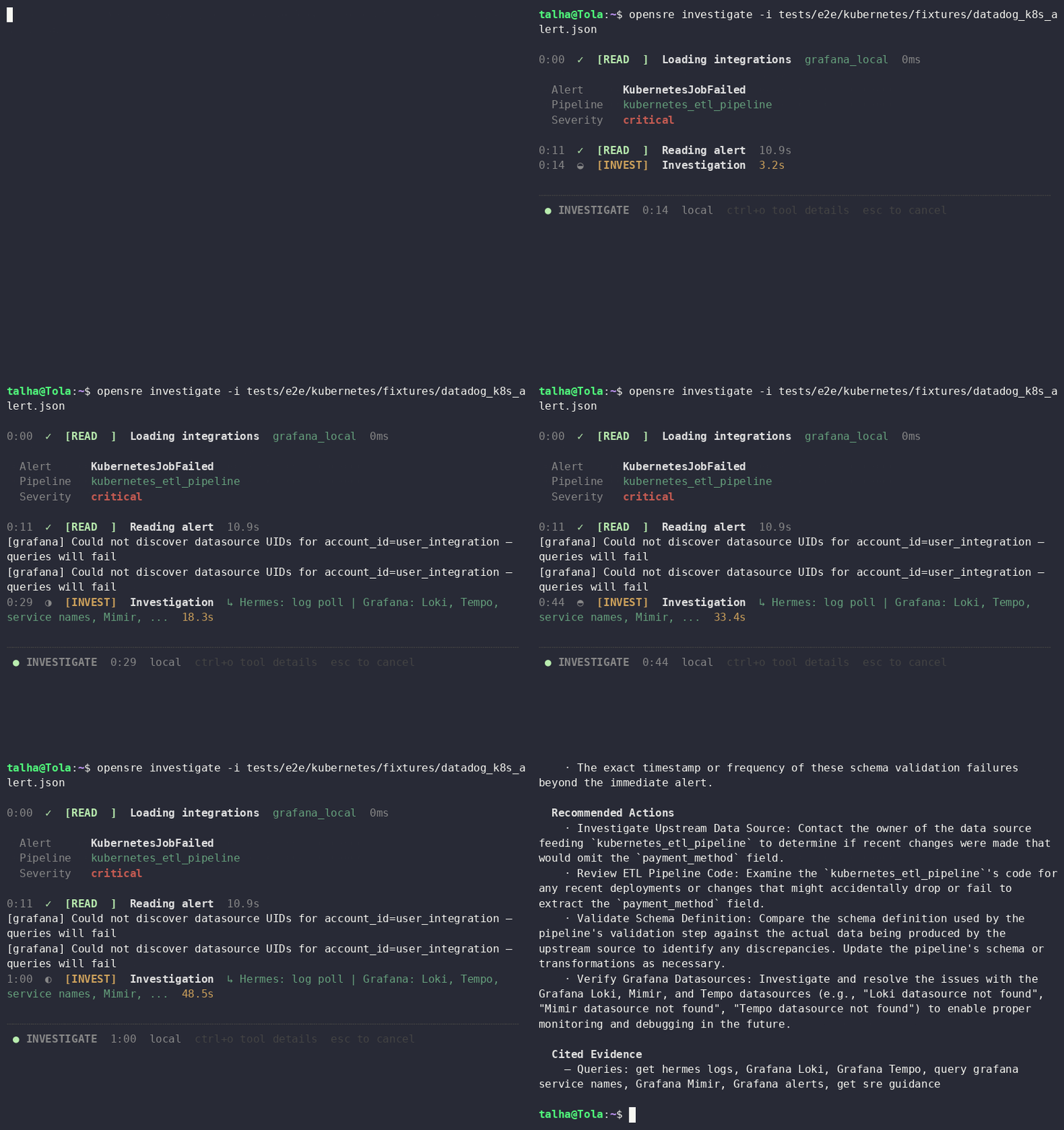 Typical first-run commands:
```bash theme={null}
curl -fsSL https://install.opensre.com | bash
opensre onboard
opensre investigate -i tests/e2e/kubernetes/fixtures/datadog_k8s_alert.json
```
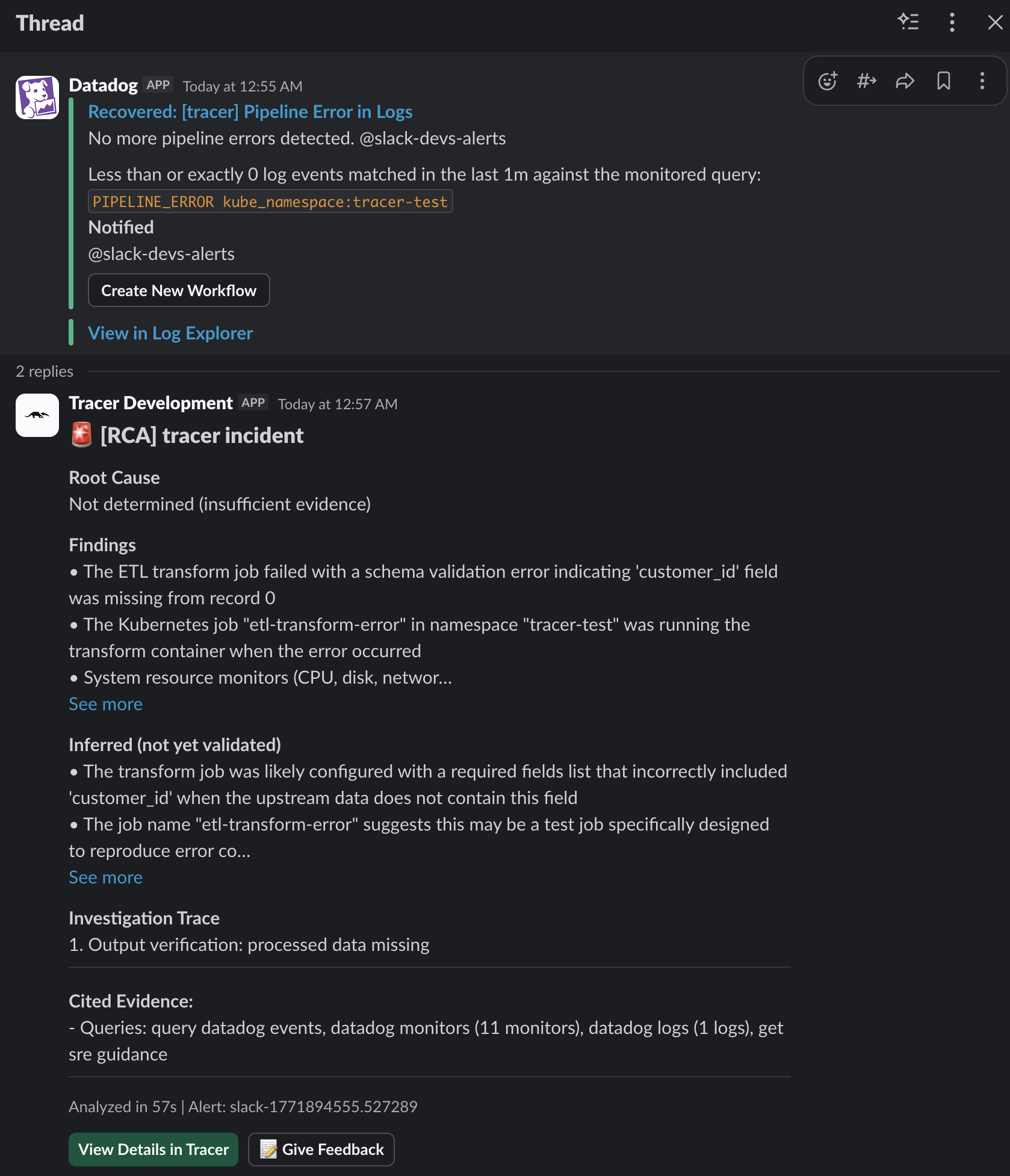
## Sample investigation output
A completed local run writes structured RCA artifacts you can open in any editor:
| File | What it contains |
| ------------------------ | ---------------------------------------------------------------- |
| `problem.md` | Incident framing, impacted components, initial hypothesis |
| `theory/hypothesis_*.md` | Each hypothesis tested during the run, with supporting evidence |
| `report.md` | Final root-cause summary, confidence, and recommended next steps |
Export a single JSON file for automation:
```bash theme={null}
opensre investigate -i --output ./rca.json
```
See [Investigations overview](/docs/investigation-overview) for the full workflow, slash commands, and Slack delivery.
Typical first-run commands:
```bash theme={null}
curl -fsSL https://install.opensre.com | bash
opensre onboard
opensre investigate -i tests/e2e/kubernetes/fixtures/datadog_k8s_alert.json
```
## Sample investigation output
A completed local run writes structured RCA artifacts you can open in any editor:
| File | What it contains |
| ------------------------ | ---------------------------------------------------------------- |
| `problem.md` | Incident framing, impacted components, initial hypothesis |
| `theory/hypothesis_*.md` | Each hypothesis tested during the run, with supporting evidence |
| `report.md` | Final root-cause summary, confidence, and recommended next steps |
Export a single JSON file for automation:
```bash theme={null}
opensre investigate -i --output ./rca.json
```
See [Investigations overview](/docs/investigation-overview) for the full workflow, slash commands, and Slack delivery.
 ## Benchmark: CloudOpsBench
Run OpenSRE against the 452-scenario CloudOpsBench Kubernetes RCA corpus and compare to published LLM-alone baselines.
```bash theme={null}
uv run python -m tests.benchmarks._framework.cli run \
--config tests/benchmarks/cloudopsbench/config.yaml \
--models claude-sonnet-4-20250514
```
See [CloudOpsBench benchmark](/docs/cloudopsbench) for configuration, integrity guards, and cost tracking.
## Share your work
Have a demo, runbook, or incident post-mortem powered by OpenSRE?
1. Open a [GitHub Discussion](https://github.com/Tracer-Cloud/opensre/discussions) with the tag **Showcase** — include commands, integrations used, and (if possible) redacted output.
2. Join the [bi-weekly giveaway](/docs/bi-weekly-giveaway) for a chance to win OpenSRE swag when you share what you built.
## Benchmark: CloudOpsBench
Run OpenSRE against the 452-scenario CloudOpsBench Kubernetes RCA corpus and compare to published LLM-alone baselines.
```bash theme={null}
uv run python -m tests.benchmarks._framework.cli run \
--config tests/benchmarks/cloudopsbench/config.yaml \
--models claude-sonnet-4-20250514
```
See [CloudOpsBench benchmark](/docs/cloudopsbench) for configuration, integrity guards, and cost tracking.
## Share your work
Have a demo, runbook, or incident post-mortem powered by OpenSRE?
1. Open a [GitHub Discussion](https://github.com/Tracer-Cloud/opensre/discussions) with the tag **Showcase** — include commands, integrations used, and (if possible) redacted output.
2. Join the [bi-weekly giveaway](/docs/bi-weekly-giveaway) for a chance to win OpenSRE swag when you share what you built.