> ## Documentation Index
> Fetch the complete documentation index at: https://opensre.com/docs/llms.txt
> Use this file to discover all available pages before exploring further.
# Hermes log monitoring
> Tail Hermes errors.log, classify incidents, alert on Telegram; run offline classifier regression tests, then try a local watch demo.
OpenSRE can **watch the log file written by a [Hermes](https://github.com/NousResearch/hermes-agent) deployment** (typically `errors.log`), turn new lines into structured incidents, optionally **deduplicate and escalate** them, and deliver alerts to **Telegram**. This page is about that **log tail + classifier + delivery** path — separate from OpenSRE’s own runtime logs.
Developer workflow: the **Hermes synthetic suite** under `tests/synthetic/hermes/` runs **offline** classifier checks (no LLM, no live infra); you can run that first, then **watch** a bundled scenario `errors.log` with `opensre hermes watch` as a small local demo. **Optional:** enable **`--investigate`** to attach the full OpenSRE RCA pipeline for **HIGH** / **CRITICAL** incidents ([quickstart](/quickstart)).
Telegram delivery uses the same credential model as the rest of OpenSRE. Configure it once with `opensre integrations setup telegram` (or `opensre onboard`) — `hermes watch` resolves the token from the integration store, environment, or keyring. You can also set `TELEGRAM_BOT_TOKEN` / `TELEGRAM_DEFAULT_CHAT_ID` directly, or pass `--chat-id`. See [Telegram](/messaging/telegram).
***
## Local demo: synthetic tests, then watch
**1 — Offline “investigation” of the classifier (pytest, no Telegram)**\
The Hermes log-classifier synthetic suite feeds real-shaped `errors.log` slices through `IncidentClassifier` and asserts against `answer.yml`. This is the same regression loop documented in the repo’s [`tests/synthetic/hermes/README.md`](https://github.com/Tracer-Cloud/opensre/blob/main/tests/synthetic/hermes/README.md):
```bash theme={null}
uv run pytest tests/synthetic/hermes -q
```
For incident-identification RCA fixtures (session topology, runtime hangs, cron delivery, KV cache drift), run the parallel suite:
```bash theme={null}
uv run pytest tests/synthetic/hermes_rca -q
```
To run every synthetic-marked test under `tests/synthetic/` (includes Hermes and other packages):
```bash theme={null}
make test-synthetic
```
**2 — Live watch on a fixture file (Telegram required)**\
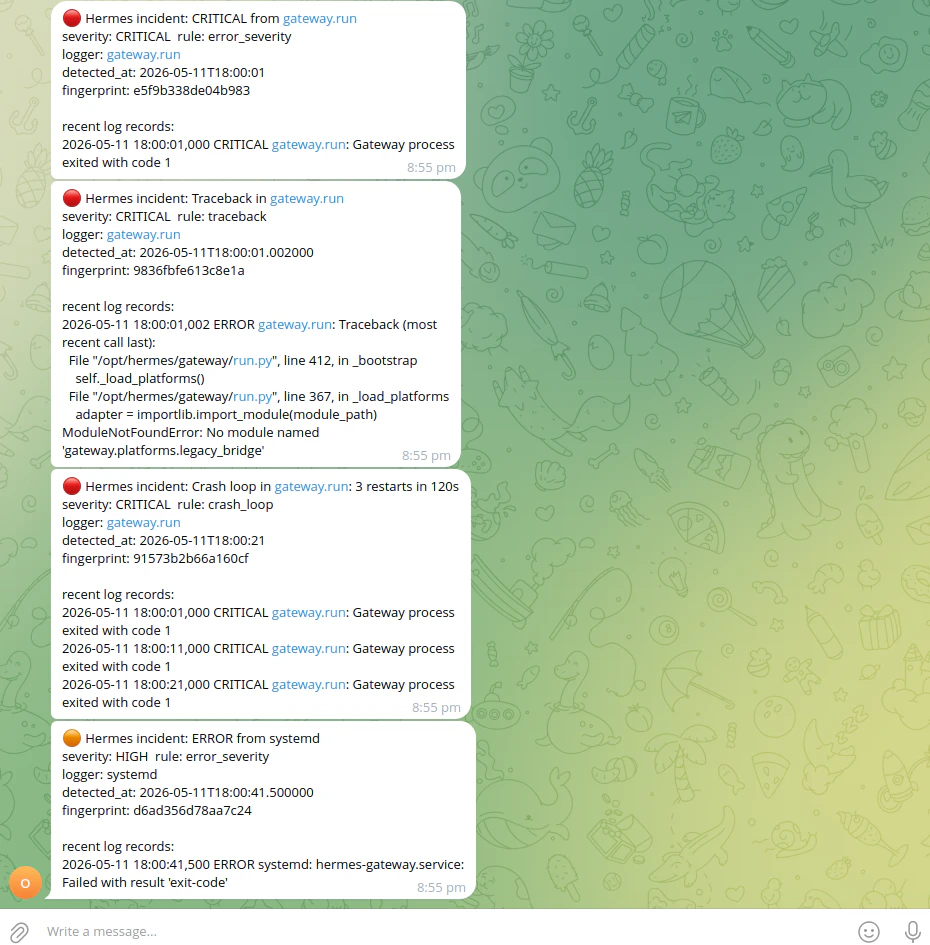
Use a scenario’s `errors.log` that emits incidents under **default** classifier settings (see **Quick check with a bundled fixture** under [CLI: live watch](#cli-live-watch) — the `002-gateway-systemd-crash-loop` example matches the screenshot there). From the repo root:
```bash theme={null}
export TELEGRAM_BOT_TOKEN=…
export TELEGRAM_DEFAULT_CHAT_ID=…
uv run opensre hermes watch \
--log-path tests/synthetic/hermes/002-gateway-systemd-crash-loop/errors.log \
--from-start
```
`--from-start` **replays** the file then keeps tailing — good for a one-shot demo of classification → Telegram. By default, watch **only reads new lines**, so without `--from-start` a static fixture produces no events until more lines are appended (use a **writable** copy of the scenario log if you want to experiment without editing files under `tests/`). Omit **`--investigate`** for a lightweight demo (**`--investigate`** runs the investigation pipeline with an LLM for **HIGH** / **CRITICAL** only; see below).
***
## What gets monitored
| Item | Default |
| -------- | -------------------------------------------------------------------- |
| Log file | `~/.hermes/logs/errors.log` |
| Override | Set `HERMES_LOG_PATH` to an absolute path if Hermes writes elsewhere |
The watcher uses a rotation-safe tailer: if the file is missing at startup, it waits until it appears. Use `--from-start` if you intentionally want to replay existing file contents before live-tailing (by default **only new lines** are considered so Telegram is not flooded on restart).
***
## CLI: live watch
Run from a machine that can read the Hermes log file and reach Telegram:
```bash theme={null}
uv run opensre hermes watch
```
Stop with **Ctrl+C** or **SIGTERM** (e.g. under systemd).
### Quick check with a bundled fixture
From the repo root you can point `--log-path` at a synthetic `errors.log`. Prefer a scenario with **ERROR** / **CRITICAL** lines so incidents fire under the **default** classifier (the live watcher does **not** read per-scenario `scenario.yml` thresholds):
```bash theme={null}
uv run opensre hermes watch \
--log-path tests/synthetic/hermes/002-gateway-systemd-crash-loop/errors.log \
--from-start
```
Example **Telegram** output when replaying that fixture (critical exit, traceback, crash loop, and systemd error):
 **Why you might see no Telegram:** `warning_burst` needs **five** warnings from the same logger within **60 seconds** (`IncidentClassifier` defaults). Several synthetic scenarios set a lower threshold in `scenario.yml` for **pytest only**; the CLI watcher ignores that file. For example `000-telegram-polling-conflict` expects bursts of **three** warnings — the suite passes, but **`hermes watch` on that file emits no `warning_burst` incidents**, so nothing is sent. Use a log with hard errors (like `002-*`) or your real `errors.log` once Hermes is writing enough warnings.
Correlator **dedup** can also reduce multiple Telegram sends for the same fingerprint; check shutdown line `hermes-watch: correlator metrics delivered=…` — if `delivered=0`, the classifier did not emit any routable incidents for that run.
### Common options
| Flag | Purpose |
| -------------------------------------------------------- | ---------------------------------------------------------------------------------------- |
| `--log-path PATH` | Hermes log file (defaults to `HERMES_LOG_PATH` expansion or `~/.hermes/logs/errors.log`) |
| `--chat-id ID` | Overrides `TELEGRAM_DEFAULT_CHAT_ID` for this run |
| `--cooldown-seconds N` | Per-fingerprint cooldown before the same incident is sent again (default `300`) |
| `--from-start` | Replay the file from the beginning, then tail |
| `--investigate` / `--no-investigate` | Run an OpenSRE RCA for `HIGH` / `CRITICAL` incidents and append the summary to Telegram |
| `--correlate` / `--no-correlate` | Route through the correlator (dedup, escalation, routing). Default: **on** |
| `--dedup-window-seconds` | Correlator dedup window when `--correlate` is on |
| `--escalation-threshold` / `--escalation-window-seconds` | Repeat-hit escalation knobs when `--correlate` is on |
### Environment variables
| Variable | Role |
| ---------------------------- | -------------------------------------------------------------------------------------------------------------------------------- |
| `TELEGRAM_BOT_TOKEN` | Bot token, unless already configured via `opensre integrations setup telegram` / `onboard` (see [Telegram](/messaging/telegram)) |
| `TELEGRAM_DEFAULT_CHAT_ID` | Default destination when `--chat-id` is omitted |
| `HERMES_LOG_PATH` | Default log path when `--log-path` is omitted |
| `OPENSRE_HERMES_INVESTIGATE` | If set to `1` / `true` / `yes` / `on`, enables investigation when the CLI does not pass `--investigate` / `--no-investigate` |
***
## Watch with full OpenSRE RCA (`--investigate`)
For production on-call, you normally run **one long-lived watcher** with the RCA bridge when you want LLM-backed summaries on serious incidents:
```bash theme={null}
uv run opensre hermes watch --investigate
```
Configure **LLM + integrations** as for any OpenSRE investigation ([quickstart](/quickstart)). When the classifier emits **HIGH** or **CRITICAL** incidents, each qualifying incident triggers **`run_investigation`** via the Telegram sink. Work runs on a **bounded thread pool** with a **timeout** so log tailing stays responsive; **MEDIUM** and lower stay on a lighter notification path by default.
For **ad hoc** Hermes log context during **another** investigation (for example Grafana-driven RCA), use **`get_hermes_logs`** below — it samples the log and does not replace a long-running **`opensre hermes watch`** for continuous classification.
***
## Agent tool: `get_hermes_logs`
During an OpenSRE investigation, the planner can call **`get_hermes_logs`** to read the same Hermes log in two modes:
* **`op="scan"`** — one-shot window of the last *N* lines; returns parsed records and incidents the classifier would emit on that window.
* **`op="tail"`** — incremental, cursor-based reads for “what’s new since last poll?”.
The tool only allows paths under permitted directories (by default `~/.hermes` and the parent of `HERMES_LOG_PATH` when set) so arbitrary file reads are blocked.
**Classifier state is not persisted between `tail` calls.** Each tool invocation uses a fresh classifier, so burst windows and traceback continuation state reset between calls. For accurate ongoing detection, use **`opensre hermes watch`** (long-lived classifier) rather than many separate `tail` calls.
***
## Synthetic regression suite
Contributors add scenarios under `tests/synthetic/hermes/` (fixtures, `scenario.yml`, `answer.yml`). Layout, schema, and “adding a new scenario” steps are in [`tests/synthetic/hermes/README.md`](https://github.com/Tracer-Cloud/opensre/blob/main/tests/synthetic/hermes/README.md).
***
## Further reading
* Implementation lives under `integrations/hermes/` in the OpenSRE repository (tailer, parser, classifier, correlator, sinks, CLI wiring).
* Surface-attribution evaluation workflow for contributors: [`docs/hermes_runbook.mdx`](https://github.com/Tracer-Cloud/opensre/blob/main/docs/hermes_runbook.mdx) in the repo (not on the public docs nav).
* If you also run [OpenClaw](/openclaw) alongside Hermes, that page covers the OpenClaw bridge (context lookup and RCA write-back).
* For false-positive risks when rules match both `message` and raw line text, see [issue #1874](https://github.com/Tracer-Cloud/opensre/issues/1874).
**Why you might see no Telegram:** `warning_burst` needs **five** warnings from the same logger within **60 seconds** (`IncidentClassifier` defaults). Several synthetic scenarios set a lower threshold in `scenario.yml` for **pytest only**; the CLI watcher ignores that file. For example `000-telegram-polling-conflict` expects bursts of **three** warnings — the suite passes, but **`hermes watch` on that file emits no `warning_burst` incidents**, so nothing is sent. Use a log with hard errors (like `002-*`) or your real `errors.log` once Hermes is writing enough warnings.
Correlator **dedup** can also reduce multiple Telegram sends for the same fingerprint; check shutdown line `hermes-watch: correlator metrics delivered=…` — if `delivered=0`, the classifier did not emit any routable incidents for that run.
### Common options
| Flag | Purpose |
| -------------------------------------------------------- | ---------------------------------------------------------------------------------------- |
| `--log-path PATH` | Hermes log file (defaults to `HERMES_LOG_PATH` expansion or `~/.hermes/logs/errors.log`) |
| `--chat-id ID` | Overrides `TELEGRAM_DEFAULT_CHAT_ID` for this run |
| `--cooldown-seconds N` | Per-fingerprint cooldown before the same incident is sent again (default `300`) |
| `--from-start` | Replay the file from the beginning, then tail |
| `--investigate` / `--no-investigate` | Run an OpenSRE RCA for `HIGH` / `CRITICAL` incidents and append the summary to Telegram |
| `--correlate` / `--no-correlate` | Route through the correlator (dedup, escalation, routing). Default: **on** |
| `--dedup-window-seconds` | Correlator dedup window when `--correlate` is on |
| `--escalation-threshold` / `--escalation-window-seconds` | Repeat-hit escalation knobs when `--correlate` is on |
### Environment variables
| Variable | Role |
| ---------------------------- | -------------------------------------------------------------------------------------------------------------------------------- |
| `TELEGRAM_BOT_TOKEN` | Bot token, unless already configured via `opensre integrations setup telegram` / `onboard` (see [Telegram](/messaging/telegram)) |
| `TELEGRAM_DEFAULT_CHAT_ID` | Default destination when `--chat-id` is omitted |
| `HERMES_LOG_PATH` | Default log path when `--log-path` is omitted |
| `OPENSRE_HERMES_INVESTIGATE` | If set to `1` / `true` / `yes` / `on`, enables investigation when the CLI does not pass `--investigate` / `--no-investigate` |
***
## Watch with full OpenSRE RCA (`--investigate`)
For production on-call, you normally run **one long-lived watcher** with the RCA bridge when you want LLM-backed summaries on serious incidents:
```bash theme={null}
uv run opensre hermes watch --investigate
```
Configure **LLM + integrations** as for any OpenSRE investigation ([quickstart](/quickstart)). When the classifier emits **HIGH** or **CRITICAL** incidents, each qualifying incident triggers **`run_investigation`** via the Telegram sink. Work runs on a **bounded thread pool** with a **timeout** so log tailing stays responsive; **MEDIUM** and lower stay on a lighter notification path by default.
For **ad hoc** Hermes log context during **another** investigation (for example Grafana-driven RCA), use **`get_hermes_logs`** below — it samples the log and does not replace a long-running **`opensre hermes watch`** for continuous classification.
***
## Agent tool: `get_hermes_logs`
During an OpenSRE investigation, the planner can call **`get_hermes_logs`** to read the same Hermes log in two modes:
* **`op="scan"`** — one-shot window of the last *N* lines; returns parsed records and incidents the classifier would emit on that window.
* **`op="tail"`** — incremental, cursor-based reads for “what’s new since last poll?”.
The tool only allows paths under permitted directories (by default `~/.hermes` and the parent of `HERMES_LOG_PATH` when set) so arbitrary file reads are blocked.
**Classifier state is not persisted between `tail` calls.** Each tool invocation uses a fresh classifier, so burst windows and traceback continuation state reset between calls. For accurate ongoing detection, use **`opensre hermes watch`** (long-lived classifier) rather than many separate `tail` calls.
***
## Synthetic regression suite
Contributors add scenarios under `tests/synthetic/hermes/` (fixtures, `scenario.yml`, `answer.yml`). Layout, schema, and “adding a new scenario” steps are in [`tests/synthetic/hermes/README.md`](https://github.com/Tracer-Cloud/opensre/blob/main/tests/synthetic/hermes/README.md).
***
## Further reading
* Implementation lives under `integrations/hermes/` in the OpenSRE repository (tailer, parser, classifier, correlator, sinks, CLI wiring).
* Surface-attribution evaluation workflow for contributors: [`docs/hermes_runbook.mdx`](https://github.com/Tracer-Cloud/opensre/blob/main/docs/hermes_runbook.mdx) in the repo (not on the public docs nav).
* If you also run [OpenClaw](/openclaw) alongside Hermes, that page covers the OpenClaw bridge (context lookup and RCA write-back).
* For false-positive risks when rules match both `message` and raw line text, see [issue #1874](https://github.com/Tracer-Cloud/opensre/issues/1874).